

Bài 15: Gửi báo cáo hoạt động hàng ngày
Chúng ta có thể tích hợp Gato GraphQL với WP-Cron để tự động hóa việc thực thi các queries GraphQL thực hiện các tác vụ quản trị, theo một khoảng thời gian nhất định. (Tiện ích mở rộng Tự động hóa là bắt buộc.)
Trong bài học hướng dẫn này, chúng ta thiết lập WP-Cron để, cứ mỗi 24 giờ, thực thi một query GraphQL lấy số lượng bình luận mới được thêm vào trang web và gửi các thống kê này đến tài khoản email mong muốn.
Query GraphQL với thống kê hàng ngày về bình luận mới
Query GraphQL này gửi email thông báo số lượng bình luận mới được thêm vào trang web trong nhiều khoảng thời gian khác nhau:
- Trong 24 giờ qua
- Trong 1 năm qua
- Kể từ đầu tháng
- Kể từ đầu năm
Chúng ta tạo một Persisted Query với slug "daily-stats-by-email-number-of-comments" và nội dung:
query CountComments {
DATE_ISO8601: _env(name: DATE_ISO8601) @remove
timeToday: _time
dateToday: _date(format: $__DATE_ISO8601, timestamp: $__timeToday)
timeYesterday: _intSubtract(subtract: 86400, from: $__timeToday)
dateYesterday: _date(format: $__DATE_ISO8601, timestamp: $__timeYesterday)
time1YearAgo: _intSubtract(subtract: 31536000, from: $__timeToday)
date1YearAgo: _date(format: $__DATE_ISO8601, timestamp: $__time1YearAgo)
timeBegOfThisMonth: _makeTime(hour: 0, minute: 0, second: 0, day: 1)
dateBegOfThisMonth: _date(format: $__DATE_ISO8601, timestamp: $__timeBegOfThisMonth)
timeBegOfThisYear: _makeTime(hour: 0, minute: 0, second: 0, month: 1, day: 1)
dateBegOfThisYear: _date(format: $__DATE_ISO8601, timestamp: $__timeBegOfThisYear)
commentsAddedInLast24Hs: commentCount(filter: { dateQuery: { after: $__dateYesterday } } )
@export(as: "commentsAddedInLast24Hs")
commentsAddedInLast1Year: commentCount(filter: { dateQuery: { after: $__date1YearAgo } } )
@export(as: "commentsAddedInLast1Year")
commentsAddedSinceBegOfThisMonth: commentCount(filter: { dateQuery: { after: $__dateBegOfThisMonth } } )
@export(as: "commentsAddedSinceBegOfThisMonth")
commentsAddedSinceBegOfThisYear: commentCount(filter: { dateQuery: { after: $__dateBegOfThisYear } } )
@export(as: "commentsAddedSinceBegOfThisYear")
}
query CreateEmailMessage @depends(on: "CountComments") {
emailMessageTemplate: _strConvertMarkdownToHTML(
text: """
This is the number of comments added to the site:
| Period | # Comments added |
| --- | --- |
| **In the last 24 hs**: | {$commentsAddedInLast24Hs} |
| **In the last 365 days**: | {$commentsAddedInLast1Year} |
| **Since begginning of this month**: | {$commentsAddedSinceBegOfThisMonth} |
| **Since begginning of this year**: | {$commentsAddedSinceBegOfThisYear} |
"""
)
emailMessage: _strReplaceMultiple(
search: [
"{$commentsAddedInLast24Hs}",
"{$commentsAddedInLast1Year}",
"{$commentsAddedSinceBegOfThisMonth}",
"{$commentsAddedSinceBegOfThisYear}"
],
replaceWith: [
$commentsAddedInLast24Hs,
$commentsAddedInLast1Year,
$commentsAddedSinceBegOfThisMonth,
$commentsAddedSinceBegOfThisYear
],
in: $__emailMessageTemplate
)
@export(as: "emailMessage")
}
mutation SendDailyStatsByEmailNumberOfComments(
$to: [String!]!
)
@depends(on: "CreateEmailMessage")
{
_sendEmail(
input: {
to: $to
subject: "Daily stats: Number of new comments"
messageAs: {
html: $emailMessage
}
}
) {
status
}
}Lên lịch thực thi query GraphQL qua WP-Cron
Chúng ta phải lên lịch sự kiện WP-Cron để thực thi hook Gato GraphQL gatographql__execute_persisted_query, truyền vào địa chỉ email để gửi email đến làm đối số, và chu kỳ lặp lại (hàng ngày).
Chúng ta thực hiện điều này qua PHP:
wp_schedule_event(
time(),
'daily',
'gatographql__execute_persisted_query',
[
'daily-stats-by-email-number-of-comments',
[
'to' => ['admin@mysite.com']
],
'SendDailyStatsByEmailNumberOfComments',
1 // This is the admin user's ID
]
);Hoặc qua plugin WP-Crontrol:
- Event type: Standard cron event
- Hook name:
gatographql__execute_persisted_query - Arguments:
["daily-stats-by-email-number-of-comments",{"to":["admin@mysite.com"]},"SendDailyStatsByEmailNumberOfComments",1] - Recurrence: Once Daily
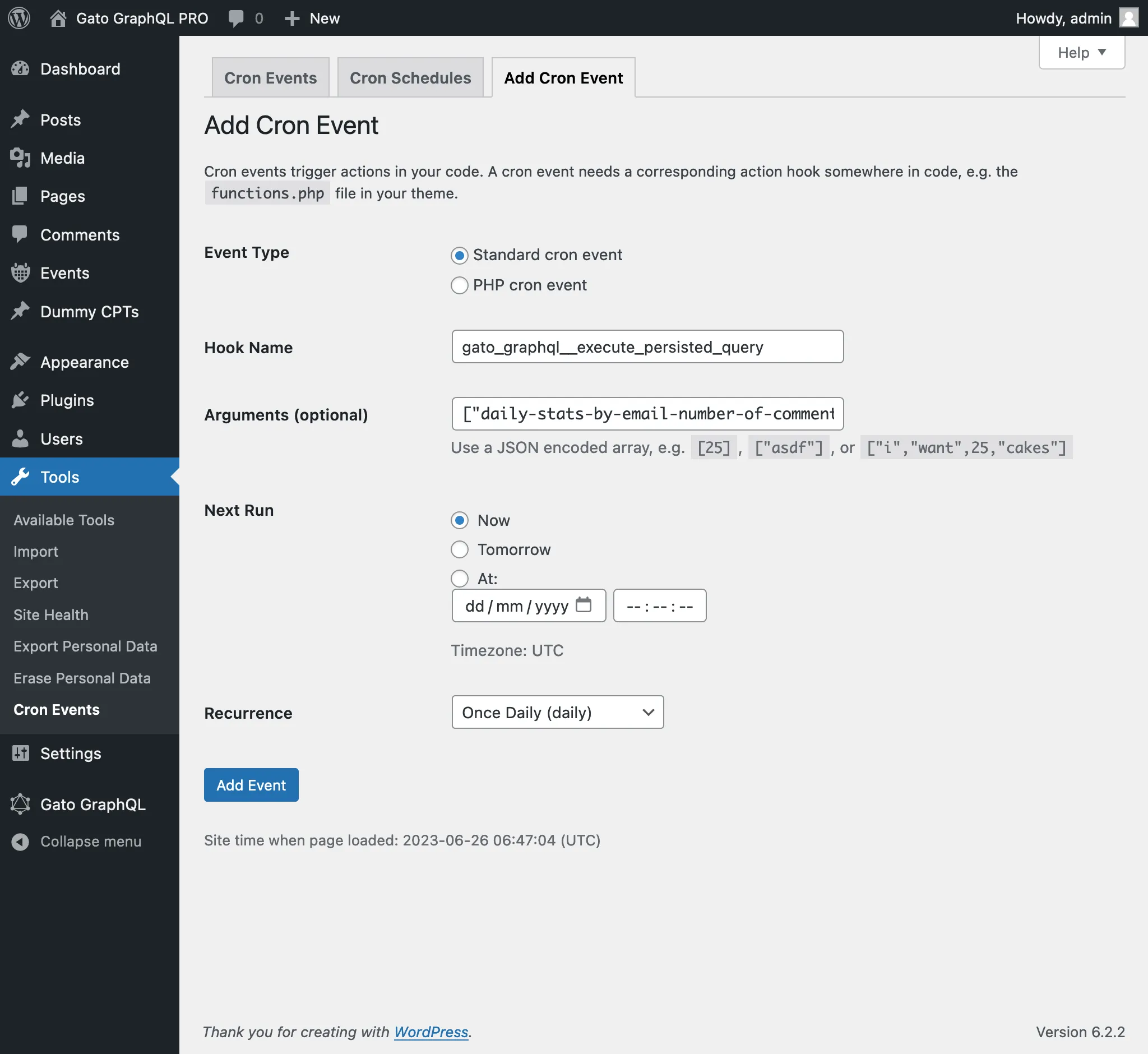
Đối số thứ 4 được truyền vào sự kiện WP-Cron là ID (dạng int) hoặc tên người dùng (dạng string) của người dùng phải được đăng nhập khi thực thi query GraphQL.
(Trong trường hợp này, giá trị 1 là ID của người dùng quản trị, và cũng có thể cung cấp tên người dùng "admin".)
Việc truyền đối số này thường cần thiết khi thực thi các mutation, vì hầu hết các mutation đều yêu cầu một người dùng (với các quyền hạn phù hợp) phải được đăng nhập.