

Tự động hóaWP-Cron
WP-Cron
Các action hook sau đây được cung cấp, để được gọi từ bên trong WP-Cron:
gatographql__execute_query
Hook này nhận các tham số sau (theo đúng thứ tự này):
| # | Bắt buộc? | Tham số | Mô tả |
|---|---|---|---|
| 1 | ✅ | $query | GraphQL query cần thực thi |
| 2 | ❌ | $variables | Các biến GraphQL |
| 3 | ❌ | $operationName | Tên operation cần thực thi |
| 4 | ❌ | $executeAsUser | Người dùng để đăng nhập khi thực thi query |
| 5 | ❌ | $schemaConfigurationIDOrSlug | ID (dạng int) hoặc slug (dạng string) của cấu hình schema cần áp dụng khi thực thi query. Truyền null sẽ dùng giá trị mặc định, và truyền -1 có nghĩa là "không dùng cấu hình schema nào" |
Tham số $executeAsUser cần thiết nếu query yêu cầu người dùng phải đăng nhập, chẳng hạn khi thực thi một mutation:
- Nếu được cung cấp, người dùng với ID (dạng int) hoặc tên người dùng (dạng string) tương ứng sẽ được đăng nhập ngay trước khi thực thi GraphQL query, và đăng xuất ngay sau đó.
- Nếu không được cung cấp, sẽ không có người dùng nào đăng nhập khi thực thi query.
gatographql__execute_persisted_query
Hook này nhận các tham số sau (theo đúng thứ tự này):
| # | Bắt buộc? | Tham số | Mô tả |
|---|---|---|---|
| 1 | ✅ | $persistedQueryIDOrSlug | ID (dạng int) hoặc slug (dạng string) của Persisted Query |
| 2 | ❌ | $variables | Các biến GraphQL |
| 3 | ❌ | $operationName | Tên operation cần thực thi |
| 4 | ❌ | $executeAsUser | Người dùng để đăng nhập khi thực thi query |
Lưu ý rằng cấu hình schema cần áp dụng đã được chọn sẵn bên trong persisted query.
Ví dụ
Sự kiện WP-Cron sau đây thực thi hook gatographql__execute_persisted_query để gửi một email hàng ngày cho biết số lượng bình luận mới được thêm vào site:
- Trong 24 giờ qua
- Trong 1 năm qua
- Kể từ đầu tháng
- Kể từ đầu năm
Chúng ta tạo một Persisted Query với slug "daily-stats-by-email-number-of-comments" và nội dung:
query CountComments {
DATE_ISO8601: _env(name: DATE_ISO8601) @remove
timeToday: _time
dateToday: _date(format: $__DATE_ISO8601, timestamp: $__timeToday)
timeYesterday: _intSubtract(subtract: 86400, from: $__timeToday)
dateYesterday: _date(format: $__DATE_ISO8601, timestamp: $__timeYesterday)
time1YearAgo: _intSubtract(subtract: 31536000, from: $__timeToday)
date1YearAgo: _date(format: $__DATE_ISO8601, timestamp: $__time1YearAgo)
timeBegOfThisMonth: _makeTime(hour: 0, minute: 0, second: 0, day: 1)
dateBegOfThisMonth: _date(format: $__DATE_ISO8601, timestamp: $__timeBegOfThisMonth)
timeBegOfThisYear: _makeTime(hour: 0, minute: 0, second: 0, month: 1, day: 1)
dateBegOfThisYear: _date(format: $__DATE_ISO8601, timestamp: $__timeBegOfThisYear)
commentsAddedInLast24Hs: commentCount(filter: { dateQuery: { after: $__dateYesterday } } )
@export(as: "commentsAddedInLast24Hs")
commentsAddedInLast1Year: commentCount(filter: { dateQuery: { after: $__date1YearAgo } } )
@export(as: "commentsAddedInLast1Year")
commentsAddedSinceBegOfThisMonth: commentCount(filter: { dateQuery: { after: $__dateBegOfThisMonth } } )
@export(as: "commentsAddedSinceBegOfThisMonth")
commentsAddedSinceBegOfThisYear: commentCount(filter: { dateQuery: { after: $__dateBegOfThisYear } } )
@export(as: "commentsAddedSinceBegOfThisYear")
}
query CreateEmailMessage @depends(on: "CountComments") {
emailMessageTemplate: _strConvertMarkdownToHTML(
text: """
This is the number of comments added to the site:
| Period | # Comments added |
| --- | --- |
| **In the last 24 hs**: | {$commentsAddedInLast24Hs} |
| **In the last 365 days**: | {$commentsAddedInLast1Year} |
| **Since begginning of this month**: | {$commentsAddedSinceBegOfThisMonth} |
| **Since begginning of this year**: | {$commentsAddedSinceBegOfThisYear} |
"""
)
emailMessage: _strReplaceMultiple(
search: [
"{$commentsAddedInLast24Hs}",
"{$commentsAddedInLast1Year}",
"{$commentsAddedSinceBegOfThisMonth}",
"{$commentsAddedSinceBegOfThisYear}"
],
replaceWith: [
$commentsAddedInLast24Hs,
$commentsAddedInLast1Year,
$commentsAddedSinceBegOfThisMonth,
$commentsAddedSinceBegOfThisYear
],
in: $__emailMessageTemplate
)
@export(as: "emailMessage")
}
mutation SendDailyStatsByEmailNumberOfComments(
$to: [String!]!
)
@depends(on: "CreateEmailMessage")
{
_sendEmail(
input: {
to: $to
subject: "Daily stats: Number of new comments"
messageAs: {
html: $emailMessage
}
}
) {
status
}
}Sau đó, chúng ta lên lịch sự kiện WP-Cron, hoặc qua PHP:
\wp_schedule_event(
time(),
'daily',
'gatographql__execute_persisted_query',
[
'daily-stats-by-email-number-of-comments',
[
'to' => ['admin@yoursite.com']
],
'SendDailyStatsByEmailNumberOfComments',
1 // This is the admin user's ID
]
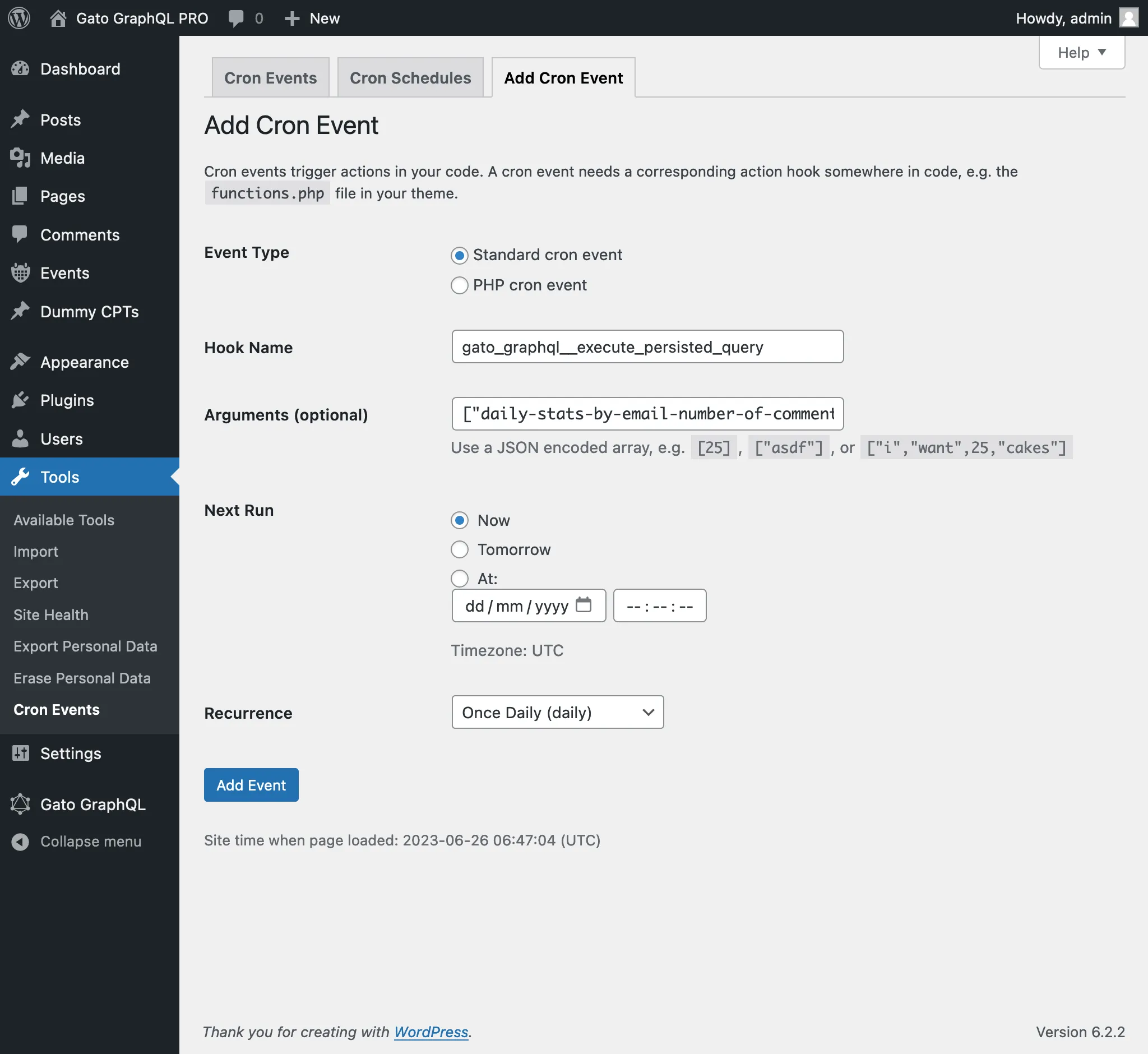
);Hoặc qua plugin WP-Crontrol:
- Loại sự kiện: Standard cron event
- Tên hook:
gatographql__execute_persisted_query - Đối số:
["daily-stats-by-email-number-of-comments",{"to":["admin@yoursite.com"]},"SendDailyStatsByEmailNumberOfComments",1] - Tần suất lặp lại: Once Daily
Next