

JetEngine CCTS
Tích hợp với plugin JetEngine của Crocoblock.
Schema GraphQL được bổ sung các trường để truy vấn dữ liệu Custom Content Type (CCT).
Các trường gốc
| Trường | Mô tả |
|---|---|
jetengineCCTEntries | Trả về danh sách các mục CCT (kiểu JetEngineCCTEntry). |
jetengineCCTEntryCount | Trả về số lượng mục CCT. |
jetengineCCTEntry | Trả về một mục CCT duy nhất (kiểu JetEngineCCTEntry). |
Slug của CCT phải được cung cấp qua đối số slug (CCT phải được đặt là có thể truy vấn trong phần Cài đặt của plugin, xem bên dưới).
Kiểu JetEngineCCTEntry
Trên kiểu JetEngineCCTEntry, chúng ta có thể truy vấn các giá trị trường thông qua:
| Trường | Mô tả |
|---|---|
id | ID cơ sở dữ liệu của mục. |
uniqueID | Định danh duy nhất cho mục, được tạo từ slug CCT và ID của mục. |
cctSlug | Slug của CCT mà mục này thuộc về. |
status | Trạng thái của mục (ví dụ: publish, draft). |
createdDate | Thời điểm mục được tạo. |
createdDateStr | Ngày tạo mục, được định dạng dưới dạng chuỗi. |
modifiedDate | Thời điểm mục được sửa đổi lần cuối. |
modifiedDateStr | Ngày sửa đổi lần cuối của mục, được định dạng dưới dạng chuỗi. |
authorID | ID của tác giả mục. |
author | Đối tượng kết nối người dùng tác giả. |
singleCustomPostID | ID của single custom post được liên kết, nếu có. |
singleCustomPost | Đối tượng kết nối single custom post được liên kết. |
fieldValues | Đối tượng JSON chứa tất cả các trường CCT cho mục đó. |
fieldValue(slug) | Để truy vấn một trường duy nhất theo slug. |
Giá trị trường CCT
Các giá trị từ fieldValue(slug) và từ mỗi khóa trong fieldValues được chuyển đổi kiểu dựa trên kiểu trường được định nghĩa trong CCT.
Các trường ID ngầm định (luôn được chuyển đổi thành int khi có mặt và không rỗng): id, singleCustomPostID, authorID.
Cách mỗi kiểu trường CCT được chuyển đổi trong phản hồi GraphQL:
float nếu có dấu thập phân; ngược lại là int.true cho 1, true, yes, on (không phân biệt chữ hoa/thường).int; "Both" → đối tượng { id, url }; ngược lại không thay đổi.int[].int; nhiều → int[].Ví dụ bên dưới sử dụng một CCT với slug "sample_cct" và các trường thuộc nhiều kiểu khác nhau (text, number, gallery, v.v.).
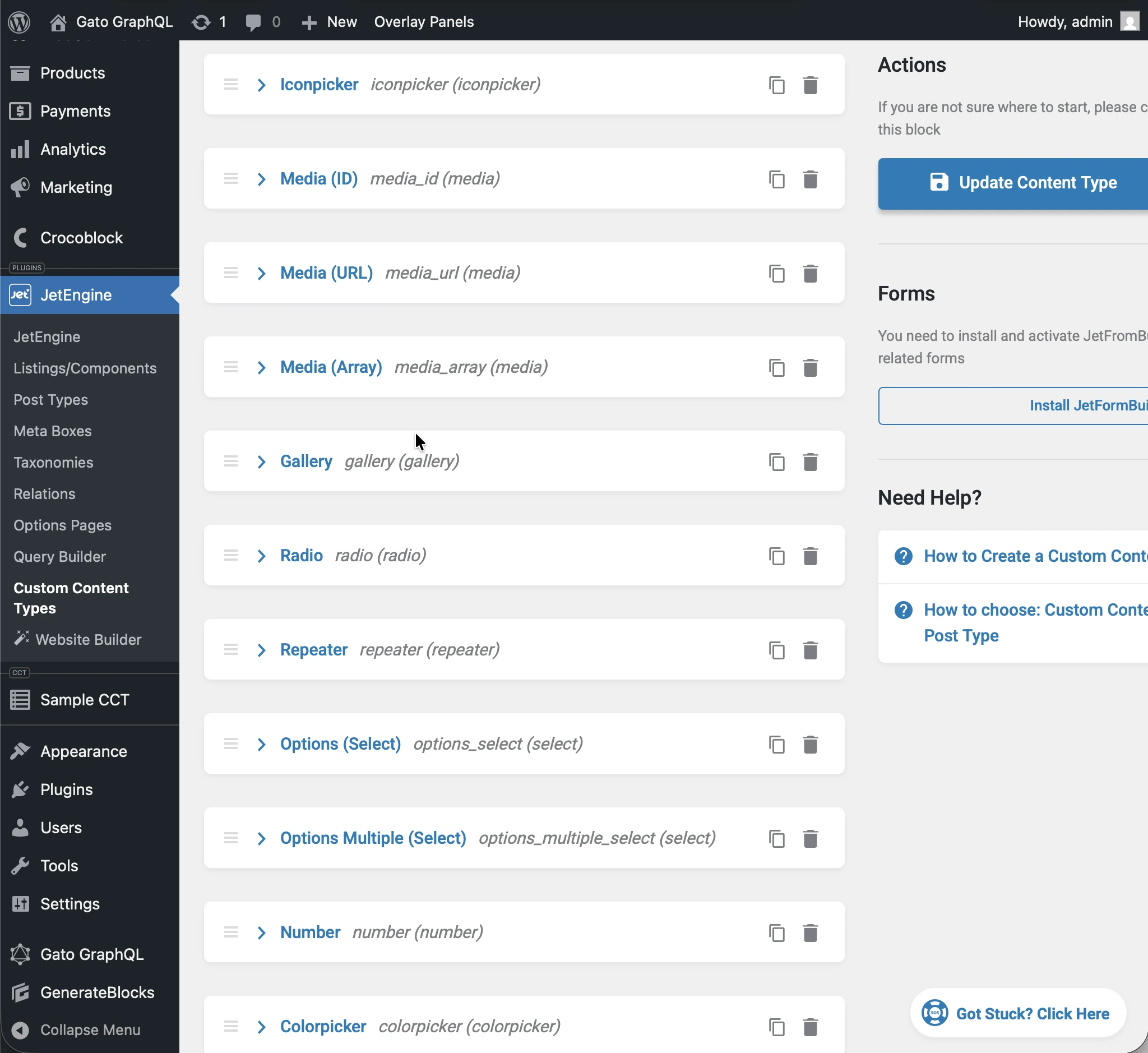
Thực thi query sau:
query JetEngineCCTEntries {
jetengineCCTEntry(cctSlug: "sample_cct", by: { id: 1 }) {
label_text: fieldValue(slug: "label_text")
textarea: fieldValue(slug: "textarea")
date: fieldValue(slug: "date")
time: fieldValue(slug: "time")
datetime: fieldValue(slug: "datetime")
wysisyg: fieldValue(slug: "wysisyg")
switcher: fieldValue(slug: "switcher")
checkbox: fieldValue(slug: "checkbox")
checkbox_array: fieldValue(slug: "checkbox_array")
iconpicker: fieldValue(slug: "iconpicker")
media_id: fieldValue(slug: "media_id")
media_url: fieldValue(slug: "media_url")
media_array: fieldValue(slug: "media_array")
gallery: fieldValue(slug: "gallery")
radio: fieldValue(slug: "radio")
repeater: fieldValue(slug: "repeater")
options_select: fieldValue(slug: "options_select")
options_multiple_select: fieldValue(slug: "options_multiple_select")
number: fieldValue(slug: "number")
colorpicker: fieldValue(slug: "colorpicker")
post: fieldValue(slug: "post")
posts: fieldValue(slug: "posts")
}
}...mỗi trường trong phản hồi được chuyển đổi sang kiểu CCT tương ứng:
{
"data": {
"jetengineCCTEntry": {
"label_text": "Some label",
"textarea": "Some description here\r\n\r\nSome description there",
"date": "2026-01-24",
"time": "09:13",
"datetime": "2026-03-07T08:00",
"wysisyg": "<p>Some <strong>description</strong> here</p>\n<p><em>Some description</em> there</p>\n<p>Some <a href=\"https://gatoplugins.com\">link</a></p>\n",
"switcher": true,
"checkbox": {
"one": true,
"two": false,
"three": true
},
"checkbox_array": [
"one",
"two"
],
"iconpicker": "fa fa-road",
"media_id": 1362,
"media_url": "https://gatographql.com/wp-content/uploads/GatoGraphQL-logo.webp",
"media_array": {
"id": 1380,
"url": "https://gatographql.com/wp-content/uploads/Funny-Dog.jpg"
},
"gallery": [
1361,
1362,
1363
],
"radio": "1",
"repeater": [
{
"label_(text)": "First item in repeater",
"date": "2026-01-17",
"time": "11:00",
"datetime": "2026-01-16T11:16",
"textarea": "Gato GraphQL provides a multitude of interactive clients,",
"wysiwyg": "<p>Gato GraphQL provides a <strong>multitude of interactive clients</strong>, and a user interface based on the <a href=\"https://wordpress.org\">WordPress editor</a>, so that anybody can operate it, whether a developer or not.</p>\n",
"switcher": true,
"iconpicker": "fa fa-inbox",
"media_id": 1361,
"media_url": "https://gatographql.com/wp-content/uploads/Funny-Dog.jpg",
"media_array": {
"id": 1380,
"url": "https://gatographql.com/wp-content/uploads/Funny-Dog.jpg"
},
"gallery": [
1363,
1361
],
"radio": "two",
"options_select": "three",
"options_multiple_select": [
"two",
"four"
],
"number": 22,
"colorpicker": "#757575",
"post": 1140,
"posts": [
1,
2
]
},
{
"label_(text)": "Second item in repeater",
"date": "2026-01-15",
"time": "00:18",
"datetime": "2026-01-18T00:00",
"textarea": "These clients make it very easy to interact with Gato GraphQL",
"wysiwyg": "<p>These clients <strong>make it very easy to interact with Gato GraphQL</strong>, directly within the <em>wp-admin</em> (and without the need of any PHP code), reducing friction and removing barriers so that anyone (developers and non-developers alike) can use it.</p>\n",
"switcher": false,
"iconpicker": "fa fa-search-plus",
"media_id": 1362,
"media_url": "https://gatographql.com/wp-content/uploads/LICENSE.txt",
"media_array": {
"id": 1363,
"url": "https://gatographql.com/wp-content/uploads/LICENSE.txt"
},
"gallery": [
1380,
1361,
1362
],
"radio": "three",
"options_select": "three",
"options_multiple_select": [
"three"
],
"number": 4469,
"colorpicker": "#2d2270",
"post": 2,
"posts": [
1688,
1682
]
}
],
"options_select": "1",
"options_multiple_select": [
"one",
"two",
"five"
],
"number": 66778899,
"colorpicker": "#721abf",
"post": 1,
"posts": [
1140,
1113
]
}
}
}Cùng một cơ chế chuyển đổi kiểu áp dụng cho mọi trường trong JSON được trả về bởi fieldValues:
query JetEngineCCTEntries {
jetengineCCTEntry(cctSlug: "sample_cct", by: { id: 1 }) {
fieldValues
}
}...trả về:
{
"data": {
"jetengineCCTEntry": {
"fieldValues": {
"label_text": "Some label",
"textarea": "Some description here\r\n\r\nSome description there",
"date": "2026-01-24",
"time": "09:13",
"datetime": "2026-03-07T08:00",
"wysisyg": "<p>Some <strong>description</strong> here</p>\n<p><em>Some description</em> there</p>\n<p>Some <a href=\"https://gatoplugins.com\">link</a></p>\n",
"switcher": true,
"checkbox": {
"one": true,
"two": false,
"three": true
},
"checkbox_array": [
"one",
"two"
],
"iconpicker": "fa fa-road",
"media_id": 1362,
"media_url": "https://gatographql.com/wp-content/uploads/GatoGraphQL-logo.webp",
"media_array": {
"id": 1380,
"url": "https://gatographql.com/wp-content/uploads/Funny-Dog.jpg"
},
"gallery": [
1361,
1362,
1363
],
"radio": "1",
"repeater": [
{
"label_(text)": "First item in repeater",
"date": "2026-01-17",
"time": "11:00",
"datetime": "2026-01-16T11:16",
"textarea": "Gato GraphQL provides a multitude of interactive clients,",
"wysiwyg": "<p>Gato GraphQL provides a <strong>multitude of interactive clients</strong>, and a user interface based on the <a href=\"https://wordpress.org\">WordPress editor</a>, so that anybody can operate it, whether a developer or not.</p>\n",
"switcher": true,
"iconpicker": "fa fa-inbox",
"media_id": 1361,
"media_url": "https://gatographql.com/wp-content/uploads/Funny-Dog.jpg",
"media_array": {
"id": 1380,
"url": "https://gatographql.com/wp-content/uploads/Funny-Dog.jpg"
},
"gallery": [
1363,
1361
],
"radio": "two",
"options_select": "three",
"options_multiple_select": [
"two",
"four"
],
"number": 22,
"colorpicker": "#757575",
"post": 1140,
"posts": [
1,
2
]
},
{
"label_(text)": "Second item in repeater",
"date": "2026-01-15",
"time": "00:18",
"datetime": "2026-01-18T00:00",
"textarea": "These clients make it very easy to interact with Gato GraphQL",
"wysiwyg": "<p>These clients <strong>make it very easy to interact with Gato GraphQL</strong>, directly within the <em>wp-admin</em> (and without the need of any PHP code), reducing friction and removing barriers so that anyone (developers and non-developers alike) can use it.</p>\n",
"switcher": false,
"iconpicker": "fa fa-search-plus",
"media_id": 1362,
"media_url": "https://gatographql.com/wp-content/uploads/LICENSE.txt",
"media_array": {
"id": 1363,
"url": "https://gatographql.com/wp-content/uploads/LICENSE.txt"
},
"gallery": [
1380,
1361,
1362
],
"radio": "three",
"options_select": "three",
"options_multiple_select": [
"three"
],
"number": 4469,
"colorpicker": "#2d2270",
"post": 2,
"posts": [
1688,
1682
]
}
],
"options_select": "1",
"options_multiple_select": [
"one",
"two",
"five"
],
"number": 66778899,
"colorpicker": "#721abf",
"post": 1,
"posts": [
1140,
1113
]
}
}
}
}Cấp quyền truy cập vào CCT
Theo mặc định, không có CCT nào có thể được truy vấn.
Để cấp quyền truy cập vào một CCT, CCT đó phải được đặt là có thể truy vấn trong phần Cài đặt của plugin.
Có 2 nơi mà cấu hình này có thể được thực hiện, theo thứ tự ưu tiên:
- Tùy chỉnh: Trong Schema Configuration tương ứng
- Chung: Trong trang Cài đặt
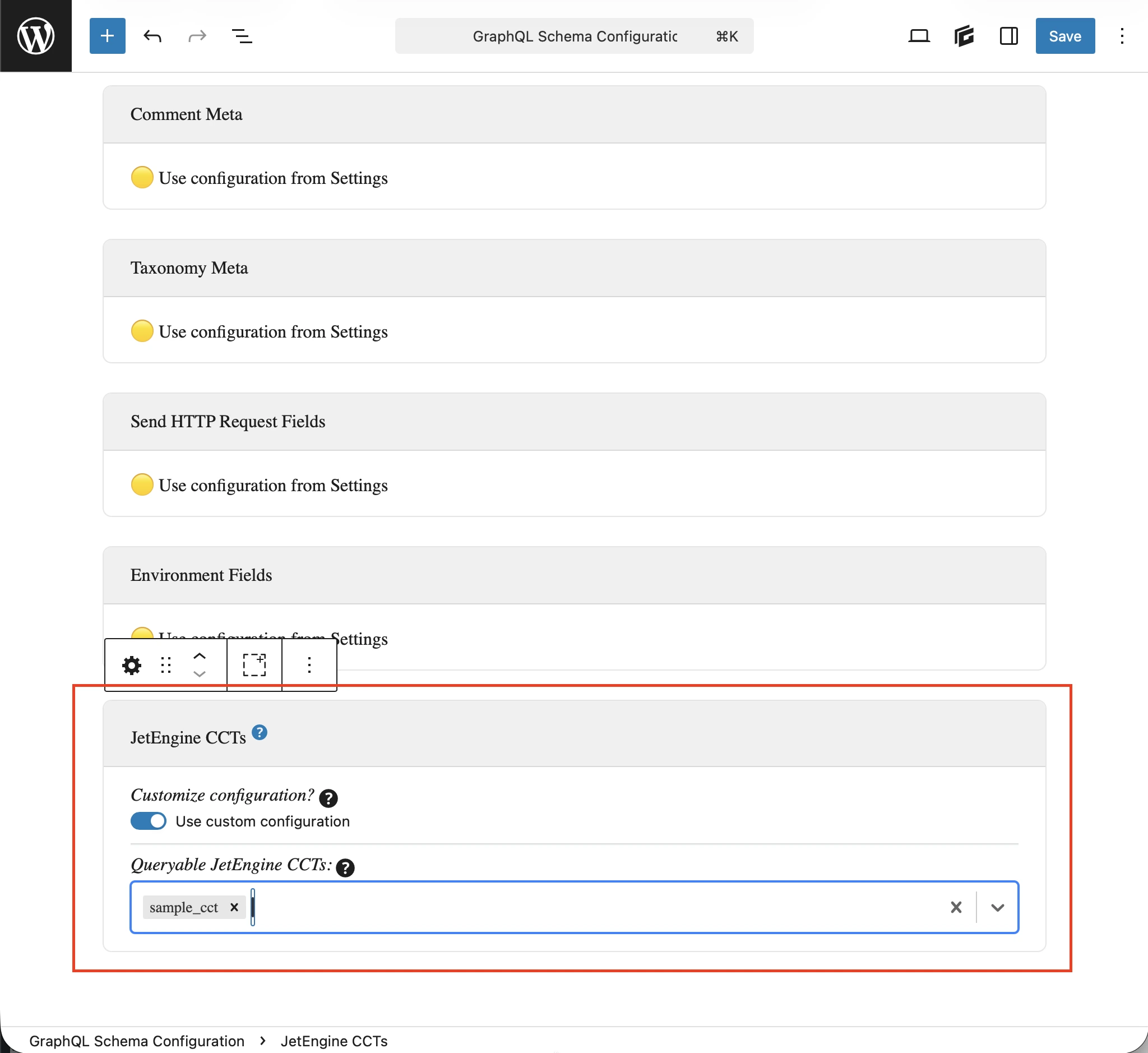
Trong Schema Configuration được áp dụng cho endpoint, chọn tùy chọn Use custom configuration rồi nhập các mục mong muốn:
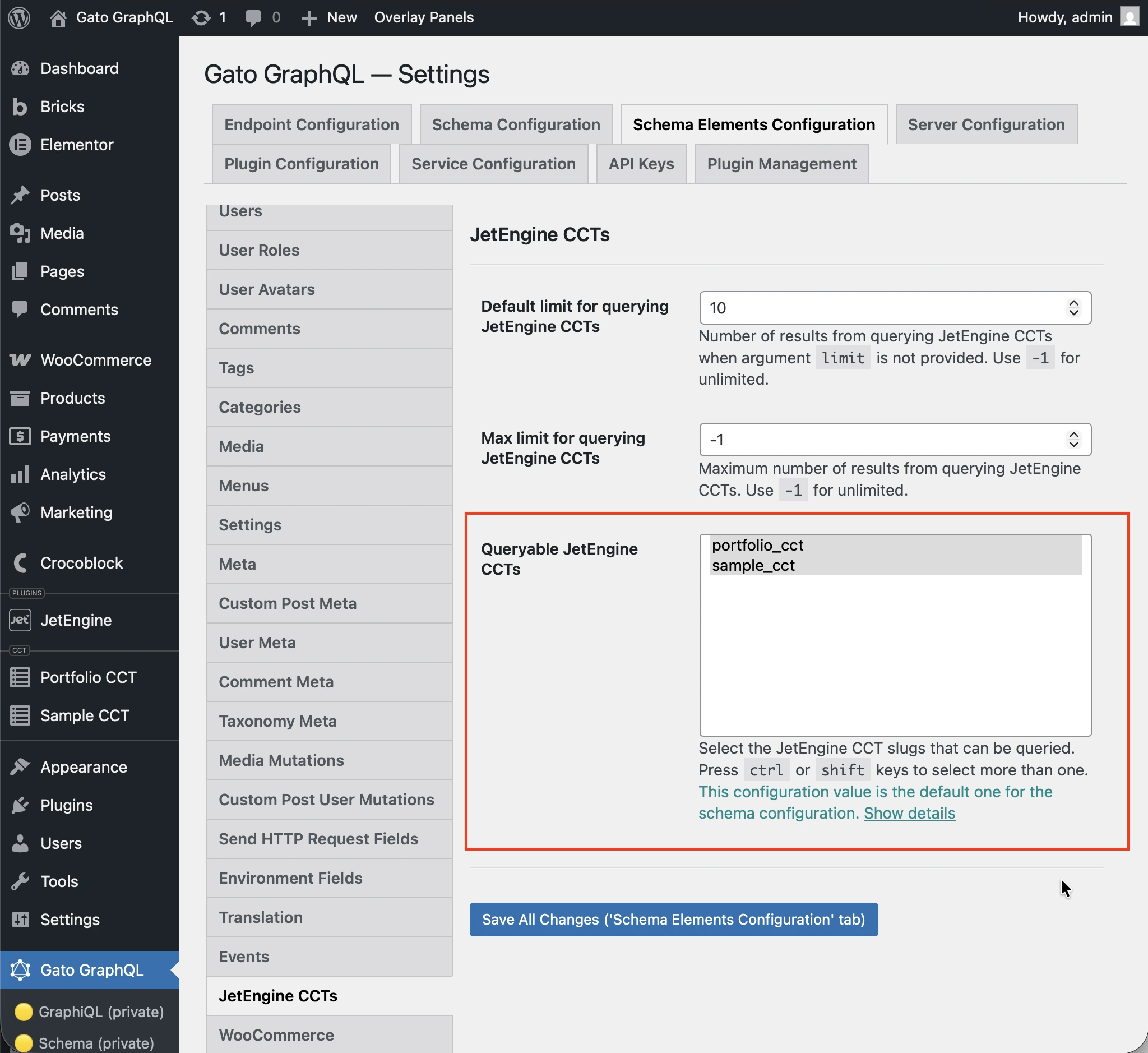
Nếu không, các mục được định nghĩa trong tùy chọn Queryable JetEngine CCTS dưới phần JetEngine CCTS trong Cài đặt sẽ được sử dụng:
Queries mẫu
Liệt kê các mục CCT:
query {
jetengineCCTEntries(cctSlug: "sample_cct") {
id
uniqueID
cctSlug
status
createdDate
modifiedDate
authorID
author {
id
name
}
singleCustomPostID
singleCustomPost {
id
title
}
fieldValues
someField: fieldValue(slug: "some_field_slug")
}
}Mục CCT đơn lẻ theo slug và ID:
query {
jetengineCCTEntry(cctSlug: "sample_cct", by: { id: 1 }) {
id
uniqueID
cctSlug
status
createdDate
modifiedDate
author {
id
name
}
singleCustomPost {
id
title
}
fieldValues
someField: fieldValue(slug: "some_field_slug")
}
}Liệt kê và đếm các mục CCT với bộ lọc, phân trang và sắp xếp:
query {
jetengineCCTEntryCount(
cctSlug: "sample_cct"
filter: { search: [{ field: "cct_author_id", value: 1, operator: EQUALS }] }
)
jetengineCCTEntries(
cctSlug: "sample_cct"
filter: { search: [{ field: "cct_author_id", value: 1, operator: EQUALS }] }
pagination: { limit: 10, offset: 0 }
sort: { by: "cct_created", order: DESC }
) {
id
authorID
}
}