

HTTP Client
Bổ sung các trường vào schema GraphQL để thực thi các yêu cầu HTTP đến máy chủ web và lấy phản hồi từ chúng:
_sendJSONObjectItemHTTPRequest_sendJSONObjectItemHTTPRequests_sendJSONObjectCollectionHTTPRequest_sendJSONObjectCollectionHTTPRequests_sendHTTPRequest_sendHTTPRequests_sendGraphQLHTTPRequest_sendGraphQLHTTPRequests
Vì lý do bảo mật, các URL có thể kết nối đến phải được cấu hình rõ ràng.
Danh sách các trường
Các trường sau đây được thêm vào schema.
_sendJSONObjectItemHTTPRequest
Truy xuất phản hồi (REST) cho một đối tượng JSON đơn lẻ.
Signature: _sendJSONObjectItemHTTPRequest(input: HTTPRequestInput!): JSONObject.
_sendJSONObjectItemHTTPRequests
Truy xuất phản hồi (REST) cho một đối tượng JSON đơn lẻ từ nhiều endpoint, được thực thi không đồng bộ (song song) hoặc đồng bộ (lần lượt từng cái).
Signature: _sendJSONObjectItemHTTPRequests(async: Boolean = true, inputs: [HTTPRequestInput!]!): [JSONObject].
_sendJSONObjectCollectionHTTPRequest
Truy xuất phản hồi (REST) cho một tập hợp các đối tượng JSON.
Signature: _sendJSONObjectCollectionHTTPRequest(input: HTTPRequestInput!): [JSONObject].
_sendJSONObjectCollectionHTTPRequests
Truy xuất phản hồi (REST) cho một tập hợp các đối tượng JSON từ nhiều endpoint, được thực thi không đồng bộ (song song) hoặc đồng bộ (lần lượt từng cái).
Signature: _sendJSONObjectCollectionHTTPRequests(async: Boolean = true, inputs: [HTTPRequestInput!]!): [[JSONObject]].
_sendHTTPRequest
Kết nối đến URL được chỉ định và truy xuất một đối tượng HTTPResponse, chứa các trường sau:
statusCode: Int!contentType: String!body: String!headers: JSONObject!header(name: String!): StringhasHeader(name: String!): Boolean!
Signature: _sendHTTPRequest(input: HTTPRequestInput!): HTTPResponse.
_sendHTTPRequests
Tương tự _sendHTTPRequest nhưng nhận nhiều URL và cho phép kết nối đến chúng không đồng bộ (song song).
Signature: _sendHTTPRequests(async: Boolean = true, inputs: [HTTPRequestInput!]!): [HTTPResponse].
_sendGraphQLHTTPRequest
Thực thi một GraphQL query đến endpoint được cung cấp và truy xuất phản hồi dưới dạng đối tượng JSON.
Input của trường này chấp nhận dữ liệu mong đợi cho GraphQL: endpoint, GraphQL query, các biến và tên thao tác, đồng thời đã thiết lập sẵn phương thức mặc định (POST) và content type (application/json).
Signature: _sendGraphQLHTTPRequest(input: GraphQLRequestInput!): JSONObject.
_sendGraphQLHTTPRequests
Tương tự _sendGraphQLHTTPRequests nhưng thực thi nhiều GraphQL queries đồng thời, có thể không đồng bộ (song song) hoặc đồng bộ (lần lượt từng cái).
Signature: _sendGraphQLHTTPRequests(async: Boolean = true, inputs: [GraphQLRequestInput!]!): JSONObject.
Cấu hình các URL được phép
Chúng ta phải cấu hình danh sách các URL mà chúng ta có thể kết nối đến.
Mỗi mục có thể là:
- Một regex (biểu thức chính quy), nếu được bao quanh bởi
/hoặc#, hoặc - URL đầy đủ, trong các trường hợp còn lại
Ví dụ, bất kỳ mục nào trong số này đều khớp với URL "https://gatographql.com/recipes/":
https://gatographql.com/recipes/#https://gatographql.com/recipes/?##https://gatographql.com/.*#/https:\\/\\/gatographql.com\\/(\S+)/
Có 2 nơi mà cấu hình này có thể được thực hiện, theo thứ tự ưu tiên:
- Tùy chỉnh: Trong Schema Configuration tương ứng
- Chung: Trong trang Cài đặt
Trong Schema Configuration được áp dụng cho endpoint, chọn tùy chọn "Use custom configuration" rồi nhập các mục mong muốn:
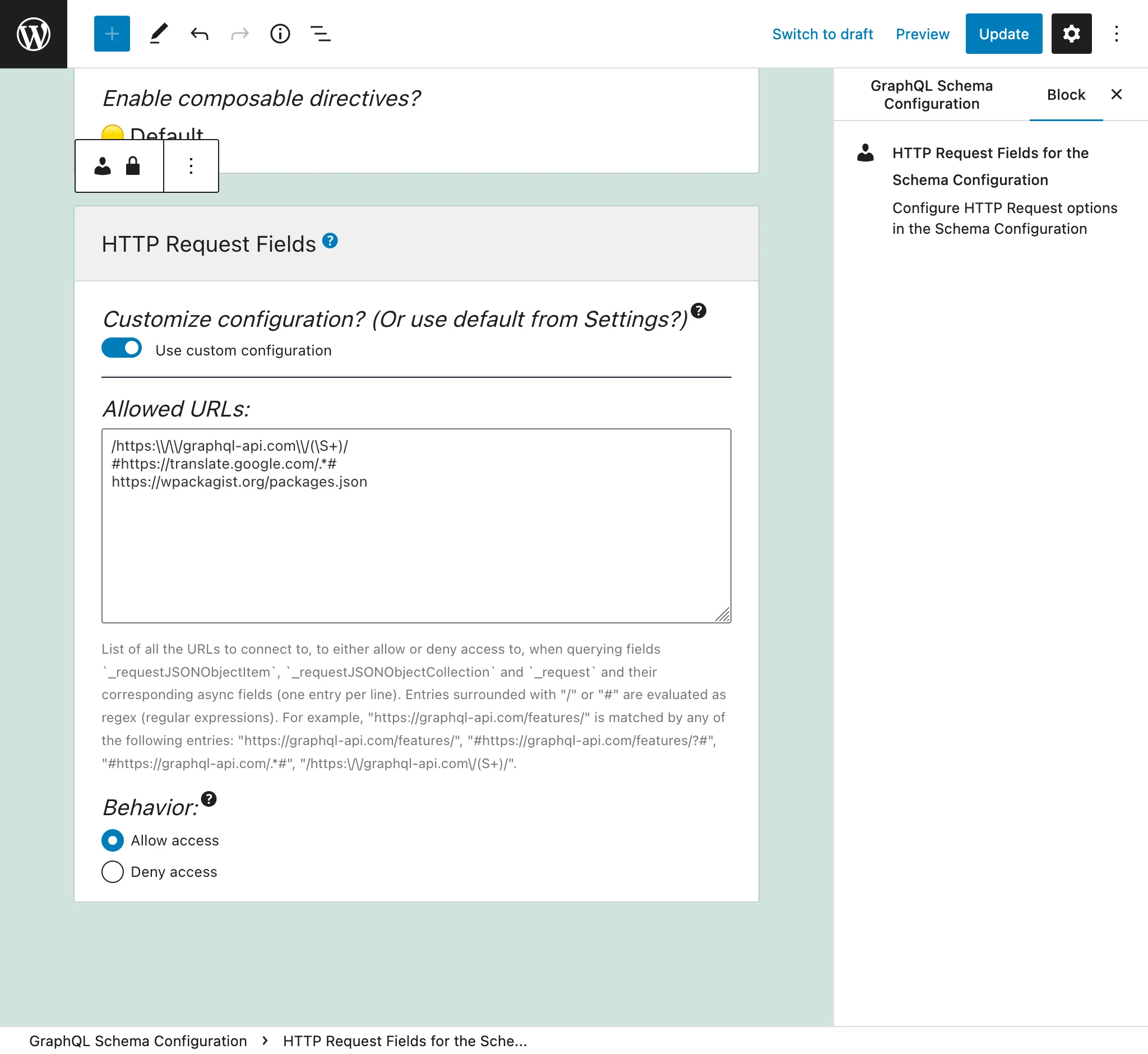
Nếu không, các mục được xác định trong tab "Send HTTP Request Fields" từ phần Cài đặt sẽ được sử dụng:
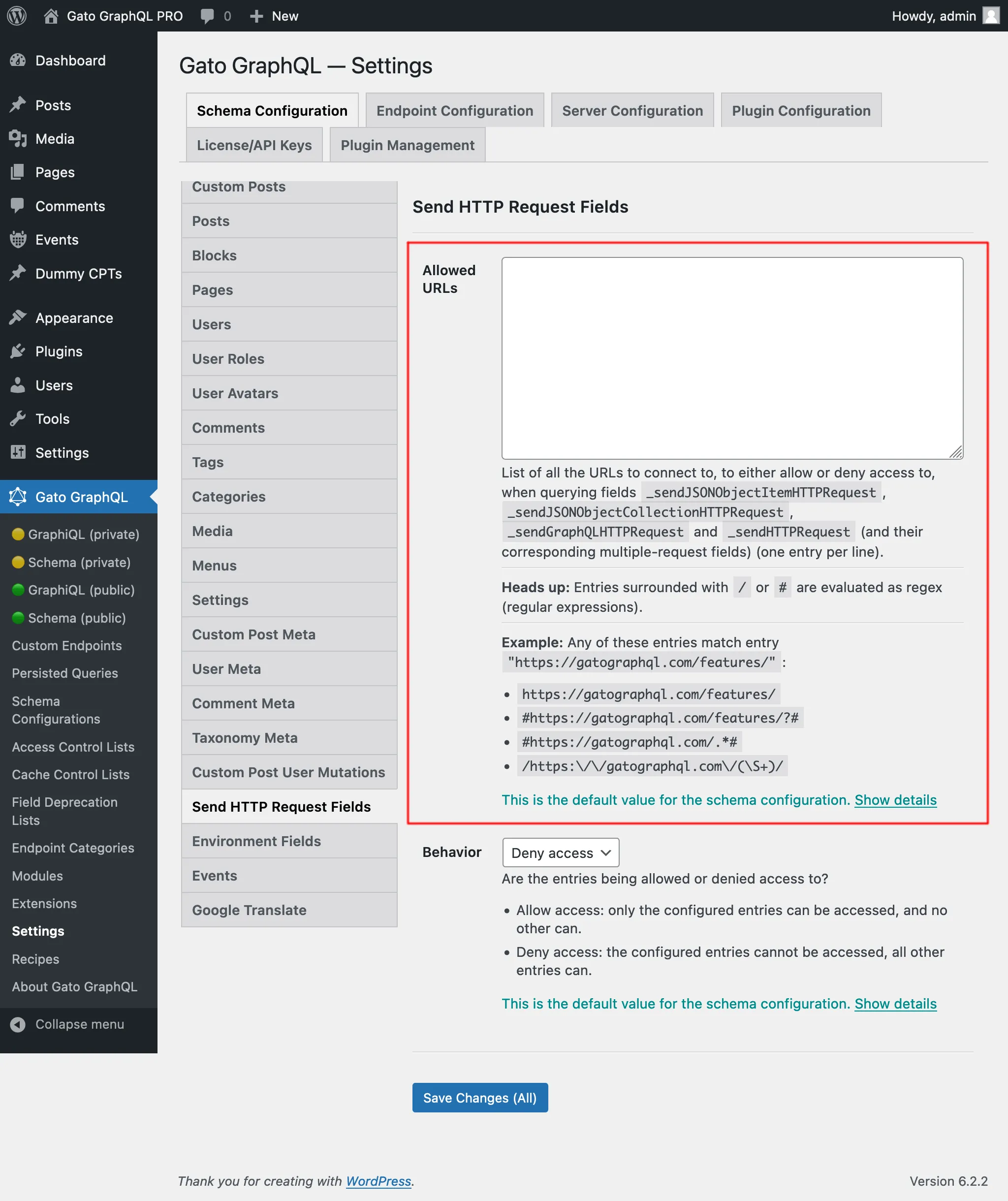
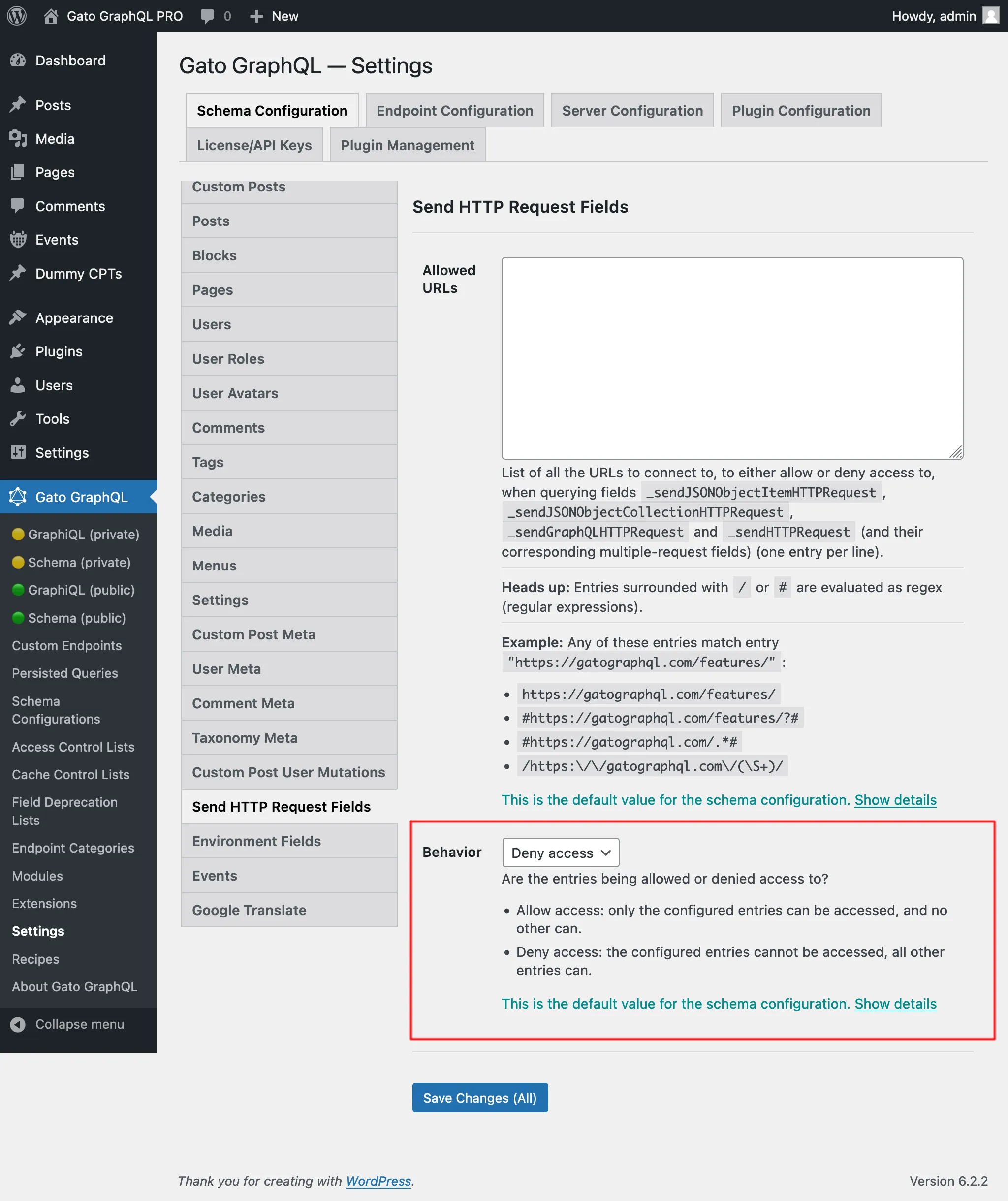
Có 2 hành vi, "Allow access" và "Deny access":
- Allow access: chỉ các mục đã cấu hình mới có thể truy cập, không có mục nào khác
- Deny access: các mục đã cấu hình không thể truy cập, tất cả các mục khác đều có thể
Quyền hạn cần thiết để truy cập các URL nội bộ
Một số URL phân giải thành các địa chỉ nội bộ (127.0.0.1, dải link-local, endpoint cloud-metadata, v.v.) có thể làm lộ các dịch vụ nội bộ nếu bị truy cập. Cài đặt này được cấu hình trên trang Cài đặt, trong phần Plugin Configuration > HTTP Client.
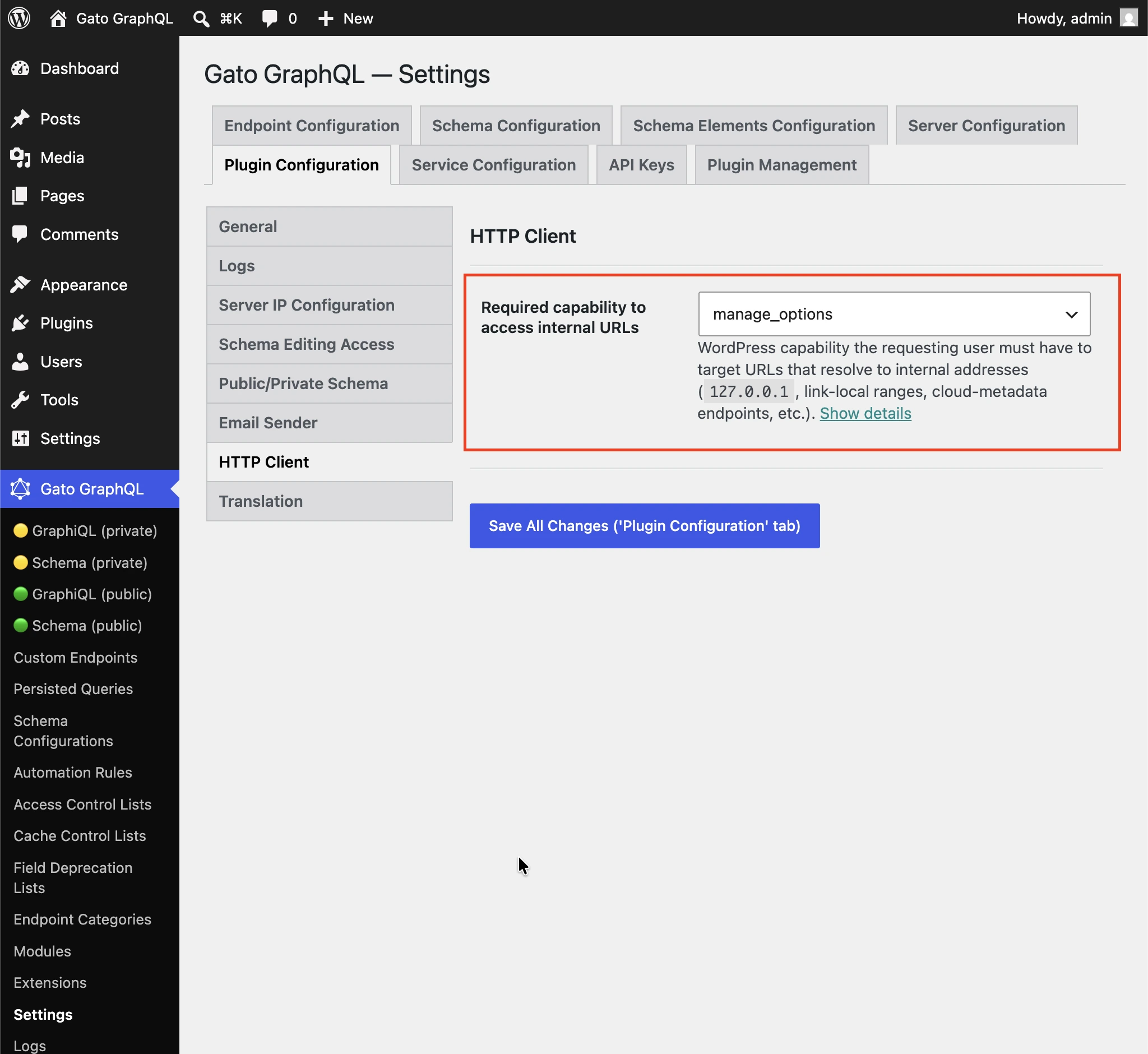
Quyền hạn WordPress mà người dùng yêu cầu phải có để nhắm đến các URL phân giải thành các địa chỉ nội bộ (127.0.0.1, dải link-local, endpoint cloud-metadata, v.v.).
Mặc định là manage_options để người dùng không phải quản trị viên không thể truy cập các dịch vụ nội bộ thông qua các trường HTTP Client.
Chọn (bất kỳ người dùng đã đăng nhập) để tắt kiểm tra quyền hạn.
Khi nào dùng từng trường
Tất cả các trường đều tương tự nhưng khác nhau.
_sendJSONObjectItemHTTPRequest
Trường này truy xuất một mục đối tượng JSON, hữu ích khi truy vấn một mục đơn lẻ từ endpoint REST, chẳng hạn từ endpoint WP REST API /wp-json/wp/v2/posts/1/.
Query này:
{
postData: _sendJSONObjectItemHTTPRequest(input: { url: "https://newapi.getpop.org/wp-json/wp/v2/posts/1/" } )
}...truy xuất phản hồi này:
{
"data": {
"postData": {
"id": 1,
"date": "2019-08-02T07:53:57",
"date_gmt": "2019-08-02T07:53:57",
"guid": {
"rendered": "https:\/\/newapi.getpop.org\/?p=1"
},
"modified": "2021-01-14T13:18:39",
"modified_gmt": "2021-01-14T13:18:39",
"slug": "hello-world",
"status": "publish",
"type": "post",
"link": "https:\/\/newapi.getpop.org\/uncategorized\/hello-world\/",
"title": {
"rendered": "Hello world!"
},
"content": {
"rendered": "\n<p>Welcome to WordPress. This is your first post. Edit or delete it, then start writing!<\/p>\n\n\n\n<p>I’m demonstrating a Youtube video:<\/p>\n\n\n\n<figure class=\"wp-block-embed is-type-video is-provider-youtube wp-block-embed-youtube wp-embed-aspect-16-9 wp-has-aspect-ratio\"><div class=\"wp-block-embed__wrapper\">\n<iframe loading=\"lazy\" title=\"Introduction to the Component-based API by Leonardo Losoviz | JSConf.Asia 2019\" width=\"750\" height=\"422\" src=\"https:\/\/www.youtube.com\/embed\/9pT-q0SSYow?feature=oembed\" frameborder=\"0\" allow=\"accelerometer; autoplay; clipboard-write; encrypted-media; gyroscope; picture-in-picture\" allowfullscreen><\/iframe>\n<\/div><figcaption>This is my presentation in JSConf Asia 2019<\/figcaption><\/figure>\n",
"protected": false
},
"excerpt": {
"rendered": "<p>Welcome to WordPress. This is your first post. Edit or delete it, then start writing! I’m demonstrating a Youtube video:<\/p>\n",
"protected": false
},
"author": 1,
"featured_media": 0,
"comment_status": "closed",
"ping_status": "open",
"sticky": false,
"template": "",
"format": "standard",
"meta": [],
"categories": [
1
],
"tags": [
193,
173
]
}
}
}_sendJSONObjectCollectionHTTPRequest
Trường này tương tự _sendJSONObjectItemHTTPRequest, nhưng truy xuất một tập hợp các đối tượng JSON, chẳng hạn từ endpoint WP REST API /wp-json/wp/v2/posts/.
Query này:
{
postData: _sendJSONObjectItemHTTPRequest(input: { url: "https://newapi.getpop.org/wp-json/wp/v2/posts/?per_page=3&_fields=id,type,title,date" } )
}...truy xuất phản hồi này:
{
"data": {
"postData": [
{
"id": 1692,
"date": "2022-04-26T10:10:08",
"type": "post",
"title": {
"rendered": "My Blogroll"
}
},
{
"id": 1657,
"date": "2020-12-21T08:24:18",
"type": "post",
"title": {
"rendered": "A tale of two cities – teaser"
}
},
{
"id": 1499,
"date": "2019-08-08T02:49:36",
"type": "post",
"title": {
"rendered": "COPE with WordPress: Post demo containing plenty of blocks"
}
}
]
}
}_sendHTTPRequest
Trường này truy xuất một đối tượng HTTPResponse với tất cả các thuộc tính từ phản hồi, để chúng ta có thể truy vấn độc lập phần body (có kiểu String, tức là không được chuyển đổi thành JSON), mã trạng thái, content type và các header.
Ví dụ, query sau:
{
_sendHTTPRequest(
input: {
url: "https://newapi.getpop.org/wp-json/wp/v2/comments/11/?_fields=id,date,content"
}
) {
statusCode
contentType
headers
body
contentLengthHeader: header(name: "Content-Length")
cacheControlHeader: header(name: "Cache-Control")
}
}...mang lại phản hồi này:
{
"data": {
"_sendHTTPRequest": {
"statusCode": 200,
"contentType": "application\/json; charset=UTF-8",
"headers": {
"Access-Control-Allow-Headers": "Authorization, X-WP-Nonce, Content-Disposition, Content-MD5, Content-Type",
"Access-Control-Expose-Headers": "X-WP-Total, X-WP-TotalPages, Link",
"Allow": "GET",
"Cache-Control": "max-age=300,no-store",
"Content-Length": "508"
},
"body": "{\"id\":11,\"date\":\"2020-12-12T04:09:36\",\"content\":{\"rendered\":\"<p>Wow, this sounds awesome!<\\\/p>\\n\"},\"_links\":{\"self\":[{\"href\":\"https:\\\/\\\/newapi.getpop.org\\\/wp-json\\\/wp\\\/v2\\\/comments\\\/11\"}],\"collection\":[{\"href\":\"https:\\\/\\\/newapi.getpop.org\\\/wp-json\\\/wp\\\/v2\\\/comments\"}],\"author\":[{\"embeddable\":true,\"href\":\"https:\\\/\\\/newapi.getpop.org\\\/wp-json\\\/wp\\\/v2\\\/users\\\/3\"}],\"up\":[{\"embeddable\":true,\"post_type\":\"post\",\"href\":\"https:\\\/\\\/newapi.getpop.org\\\/wp-json\\\/wp\\\/v2\\\/posts\\\/28\"}]}}",
"contentLengthHeader": "508",
"cacheControlHeader": "max-age=300,no-store"
}
}
}_sendGraphQLHTTPRequest
Thực thi query sau:
{
graphQLRequest: _sendGraphQLHTTPRequest(
input: {
endpoint: "https://newapi.getpop.org/api/graphql/"
query: """
query GetPosts($postIDs: [ID]!) {
posts(filter: { ids: $postIDs }) {
id
title
}
}
"""
variables: [
{
name: "postIDs",
value: [1, 1499]
}
]
}
)
}...mang lại phản hồi sau:
{
"data": {
"graphQLRequest": {
"data": {
"posts": [
{
"id": 1499,
"title": "COPE with WordPress: Post demo containing plenty of blocks"
},
{
"id": 1,
"title": "Hello world!"
}
]
}
}
}
}Các trường đa yêu cầu: _sendJSONObjectItemHTTPRequests, _sendJSONObjectCollectionHTTPRequests, _sendGraphQLHTTPRequests và _sendHTTPRequests
Các trường này hoạt động tương tự như các trường không đa yêu cầu tương ứng, nhưng chúng truy xuất dữ liệu từ nhiều endpoint cùng một lúc, có thể không đồng bộ (song song) hoặc đồng bộ (lần lượt từng cái). Các phản hồi được đặt trong một danh sách, theo cùng thứ tự mà các URL đã được xác định trong tham số urls.
Ví dụ, query sau:
{
weatherForecasts: _sendJSONObjectItemHTTPRequests(
urls: [
"https://api.weather.gov/gridpoints/TOP/31,80/forecast",
"https://api.weather.gov/gridpoints/TOP/41,55/forecast"
]
)
}...tạo ra phản hồi này:
{
"data": {
"weatherForecasts": [
{
"type": "Feature",
"geometry": {
"type": "Polygon",
"coordinates": [
[
[
-97.1089731,
39.766826299999998
],
[
-97.108526900000001,
39.744778799999999
]
]
]
},
"properties": {
"updated": "2022-03-04T09:39:46+00:00",
"units": "us",
"forecastGenerator": "BaselineForecastGenerator",
"generatedAt": "2022-03-04T10:31:47+00:00",
"updateTime": "2022-03-04T09:39:46+00:00",
"validTimes": "2022-03-04T03:00:00+00:00/P7DT22H",
"elevation": {
"unitCode": "wmoUnit:m",
"value": 441.95999999999998
}
}
},
{
"type": "Feature",
"geometry": {
"type": "Polygon",
"coordinates": [
[
[
-96.812529900000001,
39.218048000000003
],
[
-96.812148500000006,
39.195940300000004
]
]
]
},
"properties": {
"updated": "2022-03-04T09:39:46+00:00",
"units": "us",
"forecastGenerator": "BaselineForecastGenerator",
"generatedAt": "2022-03-04T10:42:26+00:00",
"updateTime": "2022-03-04T09:39:46+00:00",
"validTimes": "2022-03-04T03:00:00+00:00/P7DT22H",
"elevation": {
"unitCode": "wmoUnit:m",
"value": 409.04160000000002
}
}
}
]
}
}Thực thi đồng bộ và không đồng bộ
Các trường này cho phép chúng ta thực thi nhiều yêu cầu:
_sendHTTPRequests_sendJSONObjectItemHTTPRequests_sendJSONObjectCollectionHTTPRequests_sendGraphQLHTTPRequests
Các trường này nhận input $async, để xác định xem các yêu cầu có được thực thi đồng bộ ($async => false) hay không đồng bộ.
Thực thi đồng bộ
Các yêu cầu HTTP được thực thi theo thứ tự, mỗi yêu cầu được thực thi ngay sau khi yêu cầu trước đó đã được giải quyết.
Khi tất cả các yêu cầu HTTP thành công, trường sẽ in ra một mảng với các phản hồi của chúng, theo cùng thứ tự như chúng xuất hiện trong danh sách input.
Nếu bất kỳ yêu cầu HTTP nào thất bại, quá trình thực thi sẽ dừng lại ngay tại đó, tức là các yêu cầu HTTP tiếp theo trong danh sách input sẽ không được thực thi.
Một số nguyên nhân có thể khiến yêu cầu HTTP thất bại:
- Máy chủ cần kết nối đến đang ngoại tuyến
- Mã trạng thái của phản hồi không phải 200: lỗi nội bộ 500, không tìm thấy 404, bị từ chối 403, v.v.
- Content type của phản hồi không phải
application/json
(Hai điểm sau được _sendJSONObjectItemHTTPRequests, _sendJSONObjectCollectionHTTPRequests và _sendGraphQLHTTPRequests xử lý như lỗi, vì chúng chỉ xử lý kiểu JSON, nhưng không phải _sendHTTPRequests, vốn không áp đặt ràng buộc nào.)
Trong trường hợp lỗi, trường trả về null (tức là phản hồi của bất kỳ yêu cầu HTTP thành công trước đó sẽ không được in ra), và mục lỗi sẽ chứa extension httpRequestInputArrayPosition để chỉ ra mục nào trong danh sách input đã thất bại (bắt đầu từ 0):
{
"errors": [
{
"message": "Server error: `GET https:\/\/mysite.com\/page-triggering-some-500-error` resulted in a `500 Internal Server Error` response",
"extensions": {
"httpRequestInputArrayPosition": 0,
"field": "_sendJSONObjectItemHTTPRequests(async: false, inputs: [{url: \"https:\/\/mysite.com\/page-triggering-some-500-error\"}, {url: \"https:\/\/mysite.com\/wp-json\/wp\/v2\/posts\/1\/\"}, {url: \"https:\/\/mysite.com\/wp-json\/wp\/v2\/users\/1\/\"}])"
}
}
],
"data": {
"_sendJSONObjectItemHTTPRequests": null
}
}Thực thi không đồng bộ
Tất cả các yêu cầu HTTP được thực thi đồng thời (tức là song song), và không biết trước thứ tự các yêu cầu HTTP sẽ được giải quyết.
Khi tất cả các yêu cầu HTTP thành công, trường sẽ in ra một mảng với các phản hồi của chúng, theo cùng thứ tự như chúng xuất hiện trong danh sách input.
Bất cứ khi nào một yêu cầu HTTP thất bại, quá trình thực thi dừng lại ngay lập tức, tuy nhiên đến thời điểm đó tất cả các yêu cầu HTTP khác cũng có thể đã được thực thi.
Ngoài ra, máy chủ sẽ không chỉ ra mục nào trong danh sách đã thất bại (lưu ý rằng không có extension httpRequestInputArrayPosition trong phản hồi bên dưới):
{
"errors": [
{
"message": "Server error: `GET https:\/\/mysite.com\/page-triggering-some-500-error` resulted in a `500 Internal Server Error` response",
"extensions": {
"field": "_sendJSONObjectItemHTTPRequests(async: true, inputs: [{url: \"https:\/\/mysite.com\/page-triggering-some-500-error\"}, {url: \"https:\/\/mysite.com\/wp-json\/wp\/v2\/posts\/1\/\"}, {url: \"https:\/\/mysite.com\/wp-json\/wp\/v2\/users\/1\/\"}])"
}
}
],
"data": {
"_sendJSONObjectItemHTTPRequests": null
}
}Các trường toàn cục
Tất cả các trường này đều là Global Fields, vì vậy chúng được thêm vào mọi kiểu trong schema GraphQL: trong QueryRoot, nhưng cũng trong Post, User, Comment, v.v.
Điều này cho phép chúng ta kết nối đến một số endpoint API bên ngoài được tạo ra lúc runtime trong cùng một GraphQL query, dựa trên dữ liệu được lưu trữ trên một thực thể nào đó.
Ví dụ, chúng ta có thể duyệt qua danh sách người dùng trong cơ sở dữ liệu và, đối với mỗi người dùng, kết nối đến một hệ thống bên ngoài (chẳng hạn như CRM) để truy xuất thêm dữ liệu về họ.
Trong query này, chúng ta tạo ra endpoint API bằng cách sử dụng tính năng Field to Input và trường function _arrayJoin:
{
users(
pagination: { limit: 2 },
sort: { order: ASC, by: ID }
) {
id
endpoint: _arrayJoin(values: [
"https://newapi.getpop.org/wp-json/wp/v2/users/",
$__id,
"?_fields=name"
])
_sendJSONObjectItemHTTPRequest(input: { url: $__endpoint } )
}
}...tạo ra:
{
"data": {
"users": [
{
"id": 1,
"endpoint": "https://newapi.getpop.org/wp-json/wp/v2/users/1?_fields=name",
"_sendJSONObjectItemHTTPRequest": {
"name": "leo",
"_links": {
"self": [
{
"href": "https://newapi.getpop.org/wp-json/wp/v2/users/1"
}
],
"collection": [
{
"href": "https://newapi.getpop.org/wp-json/wp/v2/users"
}
]
}
}
},
{
"id": 2,
"endpoint": "https://newapi.getpop.org/wp-json/wp/v2/users/2?_fields=name",
"_sendJSONObjectItemHTTPRequest": {
"name": "themedemos",
"_links": {
"self": [
{
"href": "https://newapi.getpop.org/wp-json/wp/v2/users/2"
}
],
"collection": [
{
"href": "https://newapi.getpop.org/wp-json/wp/v2/users"
}
]
}
}
}
]
}
}