

Internal GraphQL Server
Tiện ích mở rộng này cài đặt một GraphQL Server nội bộ, có thể được gọi bên trong ứng dụng của bạn bằng mã PHP.
Trong số các trường hợp sử dụng khác, bạn có thể kích hoạt việc thực thi một GraphQL query bất cứ khi nào có một hành động xảy ra, để thực hiện một tác vụ liên quan (chẳng hạn như gửi thông báo, thêm mục nhật ký, xác thực một điều kiện, v.v.).
Mô tả
GraphQL server nội bộ được truy cập thông qua lớp GatoGraphQL\InternalGraphQLServer\GraphQLServer, qua ba phương thức sau:
executeQuery: Thực thi một GraphQL queryexecuteQueryInFile: Thực thi một GraphQL query chứa trong tệp (.gql)executePersistedQuery: Thực thi một persisted GraphQL query (cung cấp ID của nó dưới dạng int, hoặc slug dưới dạng string) (yêu cầu tiện ích mở rộng Persisted Queries)
Đây là các chữ ký phương thức:
namespace GatoGraphQL\InternalGraphQLServer;
use PoP\Root\HttpFoundation\Response;
class GraphQLServer {
/**
* Execute a GraphQL query
*/
public static function executeQuery(
string $query,
array $variables = [],
?string $operationName = null,
int|string|null $schemaConfigurationIDOrSlug = null,
): Response {
// ...
}
/**
* Execute a GraphQL query contained in a (`.gql`) file
*/
public static function executeQueryInFile(
string $file,
array $variables = [],
?string $operationName = null,
int|string|null $schemaConfigurationIDOrSlug = null,
): Response {
// ...
}
/**
* Execute a persisted GraphQL query (providing its object
* of type WP_Post, ID as an int, or slug as a string)
*/
public static function executePersistedQuery(
WP_Post|string|int $persistedQuery,
array $variables = [],
?string $operationName = null
): Response {
// ...
}
}Để thực thi một GraphQL query và lấy nội dung phản hồi:
// Provide the GraphQL query
$query = "{ ... }";
// Execute the query against the internal server
$response = GraphQLServer::executeQuery($query);
// Get the content and decode it
$responseContent = json_decode($response->getContent(), true);
// Access the data and errors from the response
$responseData = $responseContent["data"] ?? [];
$responseErrors = $responseContent["errors"] ?? [];Đối tượng Response cũng chứa bất kỳ header nào được tạo ra (ví dụ: nếu có Cache Control List được áp dụng, nó sẽ thêm header Cache-Control):
$responseHeaders = $response->getHeaders();
$responseCacheControlHeader = $response->getHeaderLine('Cache-Control');Lưu ý rằng lớp GraphQLServer chưa sẵn sàng trước hook init của WordPress core.
Cấu hình Schema
GraphQL Server nội bộ áp dụng Cấu hình Schema riêng của nó. Ví dụ, cấu hình mặc định được chọn trong trang Cài đặt, dưới tab "Internal GraphQL Server".
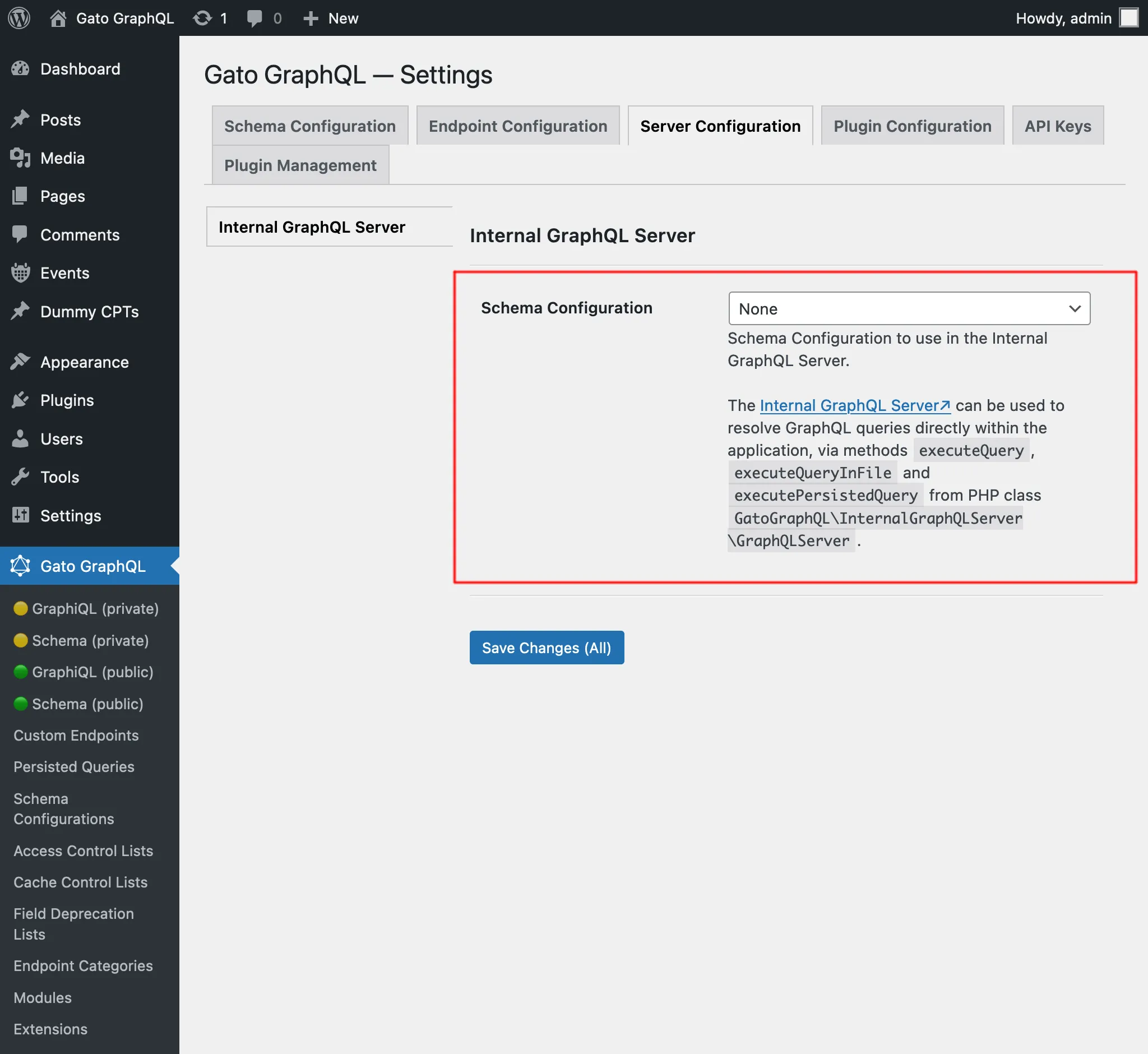
Cấu hình này cũng được áp dụng bất cứ khi nào query được thực thi với GraphQL server nội bộ được kích hoạt bởi một GraphQL query khác trong khi đang được xử lý tại một endpoint với cấu hình khác (chẳng hạn như endpoint công khai graphql/).
Để minh họa, giả sử chúng ta đã cấu hình endpoint đơn graphql/ để áp dụng Access Control List nhằm xác thực người dùng theo IP, và thực thi mutation createPost với endpoint này:
mutation {
createPost(input: {...}) {
# ...
}
}Như vậy, chỉ khách truy cập từ IP đó mới có thể thực thi mutation này.
Sau đó có một hook trên publish_post thực thi một query với GraphQL server nội bộ (ví dụ: để gửi thông báo cho quản trị viên site):
add_action(
"publish_post",
fn (int $post_id) => GraphQLServer::executeQuery("...", ["postID" => $post_id])
);GraphQL query này sẽ được xử lý bằng cấu hình schema được áp dụng cho GraphQL server nội bộ, chứ không phải cho endpoint đơn graphql/.
Kết quả là, việc xác thực theo IP người dùng sẽ không diễn ra (trừ khi Access Control List đó cũng được áp dụng cho GraphQL server nội bộ).
Gỡ lỗi sự cố
Để theo dõi việc thực thi query, chúng ta có thể duyệt qua nhật ký.
Xem Khắc phục sự cố để biết thêm chi tiết.
Ví dụ
Trong quy trình làm việc ví dụ này (cũng sử dụng các module Multiple Query Execution, Helper Function Collection và Field to Input), khi một bài viết mới được tạo trên site, chúng ta gửi thông báo đến người dùng quản trị.
Chúng ta móc vào action new_to_publish của WordPress core, lấy dữ liệu từ bài viết vừa tạo, và gọi GraphQLServer::executeQuery:
add_action(
'new_to_publish',
function (WP_Post $post) {
if ($post->post_type !== 'post') {
return;
}
// Check the contents of the query below
$query = ' ... ';
$variables = [
'postTitle' => $post->post_title,
'postContent' => $post->post_content,
]
GraphQLServer::executeQuery($query, $variables, 'SendEmail');
}
);...với GraphQL query này:
query GetEmailData(
$postTitle: String!,
$postContent: String!
) {
emailMessageTemplate: _strConvertMarkdownToHTML(
text: """
There is a new post on the site:
**{$postTitle}**:
{$postContent}
"""
)
emailMessage: _strReplaceMultiple(
search: ["{$postTitle}", "{$postContent}"],
replaceWith: [$postTitle, $postContent],
in: $__emailMessageTemplate
)
@export(as: "emailMessage")
}
mutation SendEmail @depends(on: "GetEmailData") {
_sendEmail(
input: {
to: "admin@site.com"
subject: "There is a new post"
messageAs: {
html: $emailMessage
}
}
) {
status
}
}