

Email Sender
Gửi email thông qua mutation toàn cục _sendEmail.
Mô tả
Mutation _sendEmail gửi email bằng cách thực thi hàm wp_mail của WordPress. Do đó, nó sẽ sử dụng cấu hình đã được định nghĩa để gửi email trong WordPress (chẳng hạn như nhà cung cấp SMTP được sử dụng).
Email có thể được gửi với kiểu nội dung "text" hoặc "HTML", tùy thuộc vào giá trị của input messageAs (đây là một InputObject "oneof", do đó chỉ có thể cung cấp một trong các thuộc tính của nó).
Để gửi dưới dạng văn bản, hãy cung cấp thuộc tính messageAs.text:
mutation {
_sendEmail(
input: {
to: "target@email.com"
subject: "Email with text content"
messageAs: {
text: "Hello world!"
}
}
) {
status
errors {
__typename
...on ErrorPayload {
message
}
}
}
}Để gửi dưới dạng HTML, hãy cung cấp thuộc tính messageAs.html:
mutation {
_sendEmail(
input: {
to: "target@email.com"
subject: "Email with HTML content"
messageAs: {
html: "<p>Hello world!</p>"
}
}
) {
status
errors {
__typename
...on ErrorPayload {
message
}
}
}
}Trường Toàn cục
_sendEmail là một trường toàn cục (hay chính xác hơn, là một mutation toàn cục). Điều này có nghĩa là, nếu Nested Mutations được bật, mutation này có thể được thực thi trên bất kỳ kiểu nào trong schema GraphQL (tức là không chỉ trong MutationRoot).
Điều này hữu ích khi duyệt qua danh sách người dùng và gửi email cho từng người trong số họ (trong trường hợp này, mutation được kích hoạt khi đang ở kiểu User):
mutation {
users {
email
_sendEmail(
input: {
to: $__email
subject: "..."
messageAs: {
text: "..."
}
}
) {
status
errors {
__typename
...on ErrorPayload {
message
}
}
}
}Kết hợp với các tính năng từ các extension khác (trong trường hợp này là Field to Input và PHP Functions via Schema), chúng ta có thể tạo các thông điệp được cá nhân hóa cho mỗi người dùng:
mutation {
users {
email
displayName
remainingCredits: metaValue(key: "credits")
emailMessage: _sprintf(
string: """
<p>Hello %s!</p>
<p>Your have <strong>%s remaining credits</strong> in your account.</p>
<p><a href="%s">Buy more?</a></p>
""",
values: [
$__displayName,
$__remainingCredits,
"https://mysite.com/buy-credits"
]
)
_sendEmail(
input: {
to: $__email
subject: "Remaining credits"
messageAs: {
html: $__emailMessage
}
}
) {
status
errors {
__typename
...on ErrorPayload {
message
}
}
}
}
}Quyền hạn bắt buộc
Mutation có thể được giới hạn chỉ dành cho các người dùng có một quyền hạn WordPress cụ thể. Cài đặt này được cấu hình trên trang Cài đặt, trong Plugin Configuration > Email Sender.
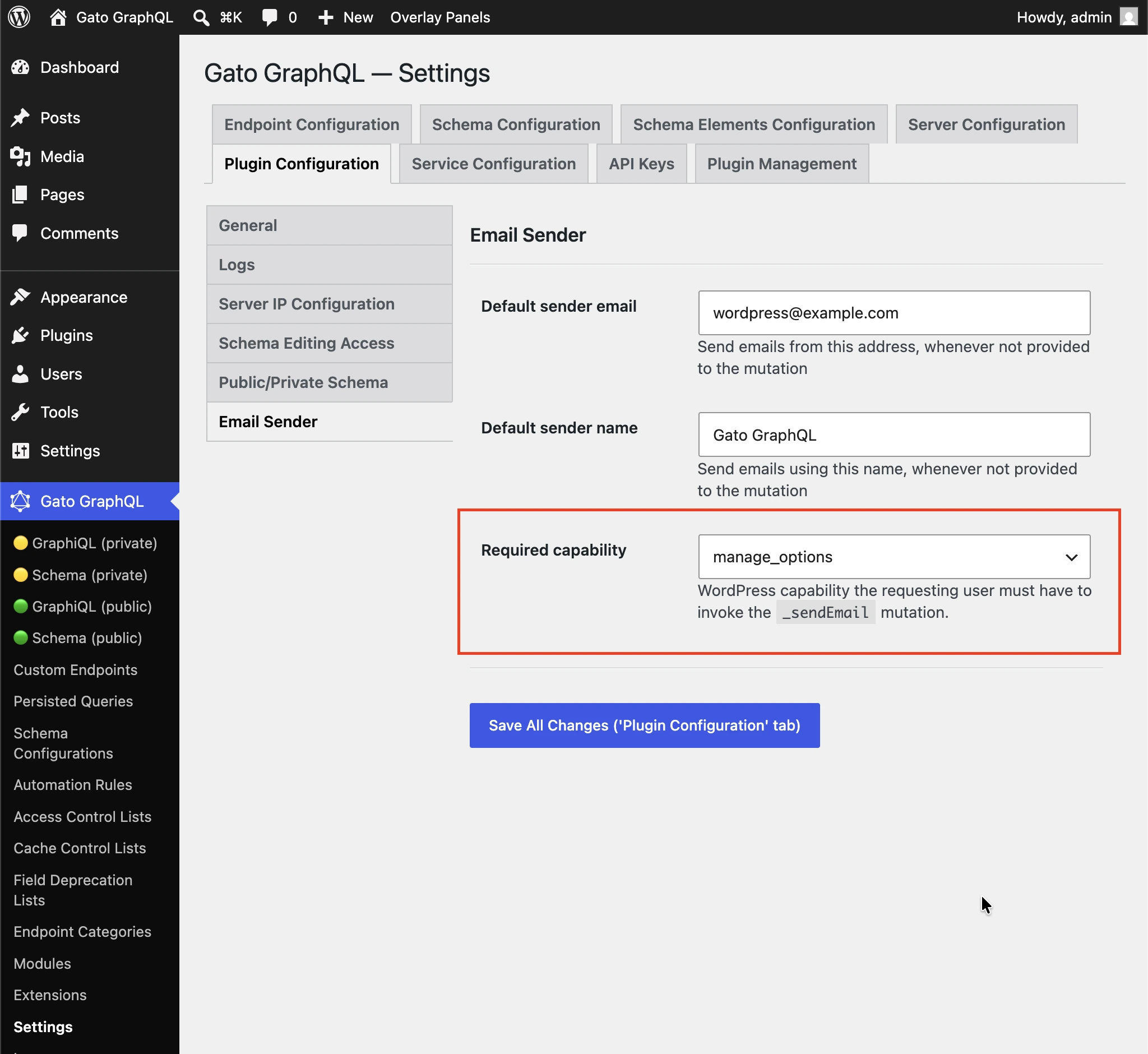
Mặc định là manage_options để các thành viên đăng ký không thể sử dụng mutation để gửi thư rác đến các người nhận tùy ý.
Chọn (any logged-in user) để tắt kiểm tra quyền hạn.
Ví dụ thêm
Query dưới đây gửi email đến người dùng quản trị với nội dung của một bài viết (ví dụ: có thể được kích hoạt mỗi khi một bài viết mới được xuất bản). Nó sử dụng các extension:
- Multiple Query Execution để quản lý query thành các đơn vị logic
- Helper Function Collection để soạn thông điệp email bằng Markdown và chuyển đổi sang HTML thông qua
_strConvertMarkdownToHTML - PHP Functions via Schema để đưa động các giá trị vào tiêu đề và nội dung email thông qua các trường
_strReplaceMultiplevà_sprintf - Field to Input để lấy và cung cấp email của quản trị viên từ
wp_options
query GetPostData($postID: ID!) {
post(by: {id: $postID}) {
title @export(as: "postTitle")
excerpt @export(as: "postExcerpt")
url @export(as: "postLink")
author {
name @export(as: "postAuthorName")
url @export(as: "postAuthorLink")
}
}
}
query GetEmailData @depends(on: "GetPostData") {
emailMessageTemplate: _strConvertMarkdownToHTML(
text: """
There is a new post by [{$postAuthorName}]({$postAuthorLink}):
**{$postTitle}**: {$postExcerpt}
[Read online]({$postLink})
"""
)
emailMessage: _strReplaceMultiple(
search: ["{$postAuthorName}", "{$postAuthorLink}", "{$postTitle}", "{$postExcerpt}", "{$postLink}"],
replaceWith: [$postAuthorName, $postAuthorLink, $postTitle, $postExcerpt, $postLink],
in: $__emailMessageTemplate
)
@export(as: "emailMessage")
subject: _sprintf(string: "New post created by %s", values: [$postAuthorName])
@export(as: "emailSubject")
}
mutation SendEmail @depends(on: "GetEmailData") {
adminEmail: optionValue(name: "admin_email")
_sendEmail(
input: {
to: $__adminEmail
subject: $emailSubject
messageAs: {
html: $emailMessage
}
}
) {
status
}
}